No scanner to hand and no printer nearby? Point your phone at a letter, form, receipt or contract and PocketCopier gives you what a copy machine would: the page found, straightened, shadows removed, black text on white paper, ready to send as a PDF.
PocketCopier uses the document camera built into your phone to find the edges of the page, then does the part a scanner app usually leaves to you: it squares the page up, removes the shadows and turns grey paper white.
Point the camera at the page, or pick a photo you already took from your gallery. Scan several pages in one go, or add more later. An angled shot on a busy desk is fine.
The page is found, squared up and cleaned: shadows removed, paper turned white, text kept crisp. When the edges are unclear the page is flagged for you to check rather than cropped wrongly, and Adjust corners lets you drag each corner into place yourself.
Reorder, rotate, retake or delete pages, then export one multi-page PDF on A4 or US Letter, or fit the sheet to the page. Or save each page as a PNG to your gallery. A copy leaves through your phone's share menu, when you decide.
Auto-align finds the edges of the page and squares it up, even when you shot it at an angle. Every page keeps a before and after view, so you can see exactly what it did.
Built to do what a copy machine does: grey paper becomes white, shadows disappear, and the text stays crisp black. Grayscale and Original are there when you want them instead.
Scan a whole contract in one go, reorder or rotate the pages, then export a single PDF on A4 or US Letter. Or fit the sheet to the page when the original is an odd size.
Save any page to your gallery as a PNG, or share it straight from the app. Pro adds a ZIP of every page at once for the days you need the whole document as images.
When the edges are unclear the page is flagged for you to check rather than cropped wrongly. Open Adjust corners, drag each corner into place and apply. The original photo is kept.
No account and no sign-in. Pages are processed on your phone and your documents are kept in the app. A copy goes somewhere else only when you share it or save it to your gallery.
PocketCopier is for the days a form, a landlord or a teacher needs a copy today. These are the pages it tends to be.
Leases and rental applications
Receipts for your tax return
Signed letters
Application forms
Contracts
Meeting notes
Worksheets
Homework
Free keeps unlimited documents, PDF and PNG export and no watermark. Pro is a one-time purchase that removes the page limits and adds Magic colour and ZIP export. No subscription.
Everything you need for the occasional copy.
Removes the page limits and adds the extras.
Price shown in GBP; the app shows your own storefront's price. Pro is a one-time purchase, not a subscription. There is nothing to cancel.
Most scanner apps hand back a slightly tidied photograph: the desk shadow still across it, the paper grey, the page a little askew. Then they ask for a subscription. A copy machine never did any of that.
PocketCopier was built to give back what the machine at the office gives back: a square, sharp, black-on-white page, as a PDF you can send. Auto-align does the straightening, Photocopy mode does the cleaning, and the whole thing runs on your phone with no account and no ads. Pro is one payment, because there is nothing recurring to pay for.
Free pages a day, on unlimited documents, with PDF and PNG export and no watermark.
One-time Pro unlock: unlimited pages, Magic colour and ZIP export. No subscription.
Ads, accounts and sign-ins. Pages are processed on your phone and your documents are kept in the app.
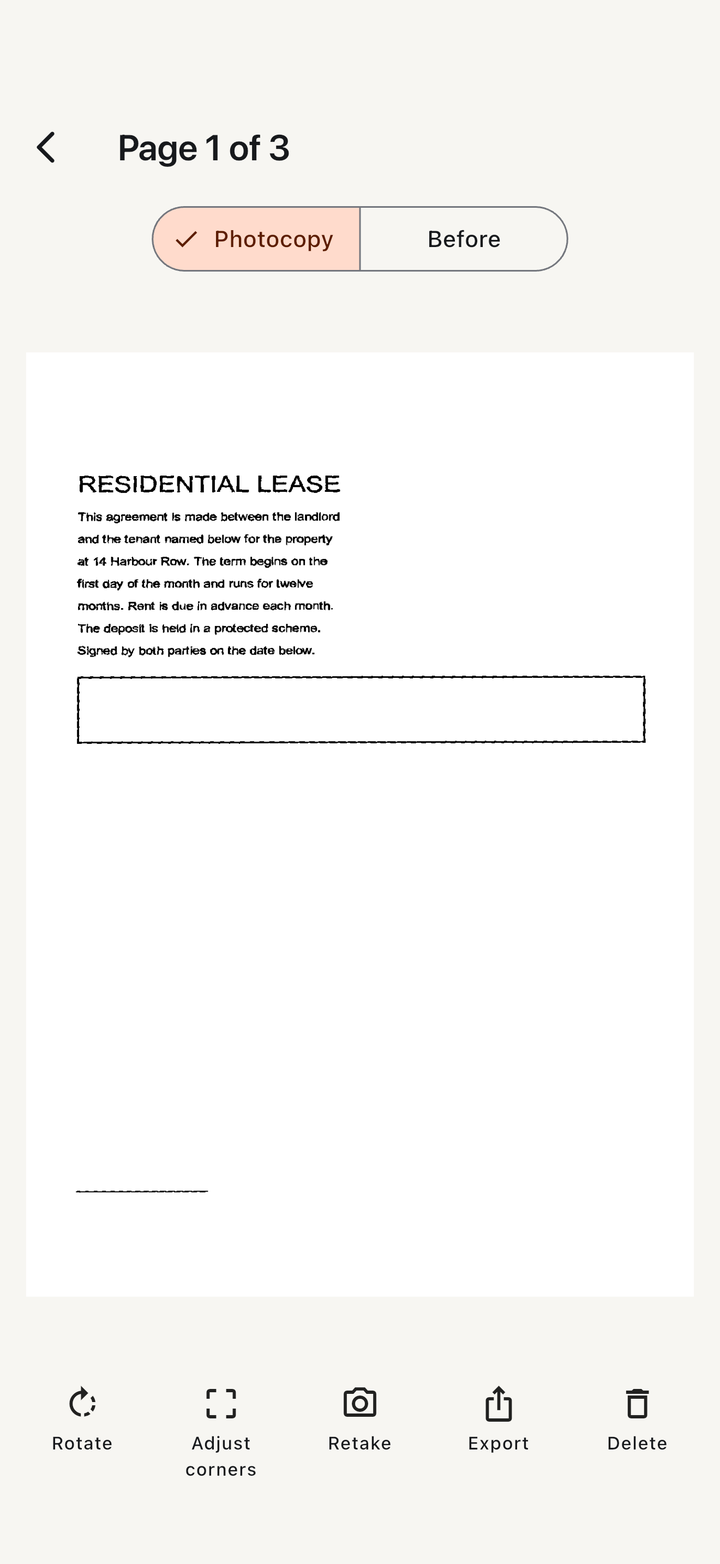
It works as a document scanner and a PDF scanner, but what you get back is a proper photocopy: the page squared up, the shadows gone, grey paper turned white. If you only want the photo tidied, the Original and Grayscale filters do that.
That is the normal case. Auto-align finds the edges of the page and straightens it, even on a busy desk. Every page keeps a Before view, so you can see the original photo next to the copy.
When the edges are unclear the page is flagged for you to check rather than cropped wrongly. Open Adjust corners, drag each corner into place and apply. The original photo is kept, so nothing is lost.
Yes. Scan several pages in one go or add more later, reorder, rotate, retake or delete them, then export one PDF on A4 or US Letter, or fit the sheet to the page. Free documents hold up to 5 pages; Pro removes the limit.
Yes. Import it from your gallery and PocketCopier straightens and cleans it the same way as a fresh capture.
They are kept in the app on your phone, and pages are processed on your phone. A copy goes anywhere else only when you share it through your phone's share menu or save a PNG to your gallery. There is no account and no sign-in. On Android, the Google document-scanner component built into the app sends Google limited diagnostic information, never your documents; the privacy policy explains this.
Free: unlimited documents, PDF and PNG export, no watermark, up to 5 pages per document and 5 pages a day. Pro is a one-time £9.99 purchase that removes both page limits and adds Magic colour and ZIP export. No subscription.
A Pro filter for pages where the colour matters. It turns the paper white while keeping the colours of the ink, so a highlighted worksheet or a form signed in blue comes out clean without going black and white.
No. Pro is one payment. It restores on a new phone through Restore purchase in Settings, and the price shown in the app comes from your own storefront.
PocketCopier is free to download, with a one-time £9.99 Pro unlock. No ads, no account, no subscription, and your copies stay on your phone.